webpack 프로젝트를 배포할 때는 경로 설정이 상당히 중요한 것 같다.
평소에 정적 페이지 배포 호스팅으로 netlify나 vercel을 자주 쓰는데,
이번에는 페이지 볼륨이 매우 적어서 github pages로 배포를 해보았다.
그런데 보통 빌드를 하면 dist 폴더가 자동 생성되고 이 폴더에 번들링된 js파일이 생기기 마련인데,
이번 프로젝트는 dist가 아닌 public 폴더에 빌드 파일이 생성되도록 설정되어 있었고,
이게 github.io로 배포할 때 문제가 생겼는지
계속 index.js에서 불러왔던 이미지 파일 경로를 찾지 못했다.
이때 에러 메시지로 떴던 게 이미지 파일 경로를 못 찾은 것 외에도 자꾸 webGL이 에러가 너무 많아서 표시 안할거라고 떠서 three.js 관련 코드 문제인 줄 알았는데 아니었다..
- webpack.config.js 설정
const path = require('path')

module.exports = {
  mode: 'production',
  entry: './src/index.js',
  output: {
    path: path.resolve(__dirname, 'dist'),	// 수정 전에는 'public'으로 설정되어 있었음
    filename: 'bundle.js',
    publicPath: '/3d-sphere-reflection/',
  },
  performance: {
    maxEntrypointSize: 1024000,
    maxAssetSize: 1024000,
  },
  devServer: {
    publicPath: '/public/',
    compress: true,
    port: 9000,
    hot: true,
  },
}
output path를 'dist'로 설정한 뒤 다시 빌드하고, index.html 파일에서 불러올 js파일을 'public'이 아닌 'dist'의 번들링된 js로 바꿔준 다음에 배포했더니 이미지 경로를 잘 찾으면서 호스팅까지 완료되었다.
- HTML
<!DOCTYPE html>
<html lang="en">
  <head>
    <meta charset="utf-8" />
    <meta
      name="viewport"
      content="width=device-width, initial-scale=1, shrink-to-fit=no"
    />
    <link rel="icon" href="static/favicon.ico" type="image/x-icon" />
    <link rel="stylesheet" href="static/styles/main.css" />
    <title>3d sphere realistic reflection</title>
  </head>
  <body>
    <script src="dist/bundle.js"></script>	<!--public/bundle.js에서 변경-->
  </body>
</html>
- index.js에서 사용된 이미지 경로
let urls = [
    '../static/textures/posx.jpg',
    '../static/textures/negx.jpg',
    '../static/textures/posy.jpg',
    '../static/textures/negy.jpg',
    '../static/textures/posz.jpg',
    '../static/textures/negz.jpg',
]
- 파일 구조
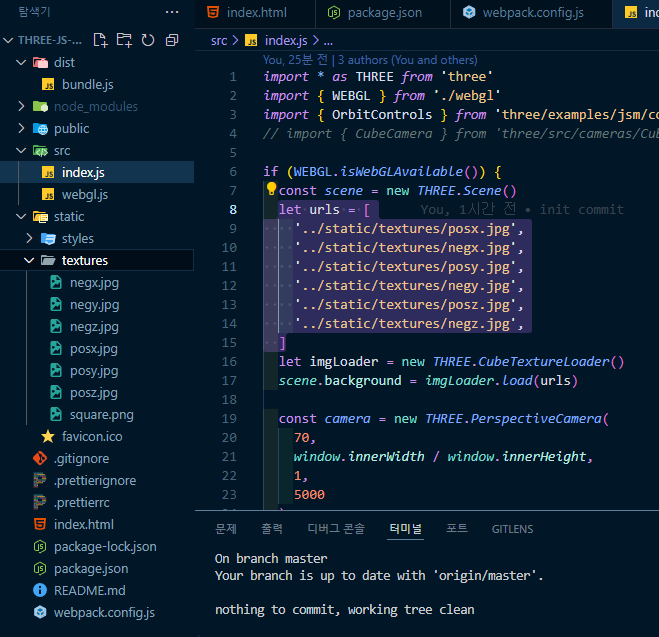
'JS' 카테고리의 다른 글
| 형 변환 (문자, 숫자 -> 불리언 & 산수연산, 관계연산) (0) | 2025.03.01 |
|---|---|
| 이중 부정(!!) (0) | 2025.03.01 |
| 한글만 두 번씩 입력되는 문제 (IME Composition) (0) | 2025.02.16 |
| debounce & throttle (0) | 2025.01.05 |
| 나의 첫 'REST API' 사용 (0) | 2024.09.16 |